For café owners

You make the coffee. We run the rest.

CafeBOS is a complete business operating system built for your café: billing, delivery and pickup, your own website, stock, staff, money and marketing in one place. We build it for you, run it with you, and keep adding what you need as you grow.

Built for each caféNo setup by youPriced as you grow

90 seconds. Sound on. Captions are in the player menu.

Why we built this

You opened a café to make people's mornings. Not to chase bills.

Somewhere between the first espresso and the day-close, the job changes. You become the person who checks the stock sheet, reconciles UPI, answers the delivery app, counts who came to work and finds the receipt the accountant asked for.

Most cafés run on six apps and a notebook. None of them talk to each other, so the owner becomes the link between them. CafeBOS replaces the pile with one system that knows your whole café, and a team that looks after it with you.

YOUR CAFÉ · TODAY
What it takes to run the place

Billing appreplaced
Stock spreadsheetreplaced
Attendance registerreplaced
Orders on WhatsAppreplaced
Website from launch weekreplaced
Shoebox of receiptsreplaced

TOTAL1 CafeBOS

Every sale updates stock, loyalty,
GST and the day's cash. Thank you!
30+modules working today, from billing to payroll
1menu that feeds the counter, QR menu, TV and website
2languages on screen: English and Hindi
0settings for you to configure. We set it up.
What runs on CafeBOS

One system for the whole café.

Everything below works today and is connected: a sale at the counter moves stock, points, cash and GST at the same moment.

Counter

Bill in seconds, any way they order.

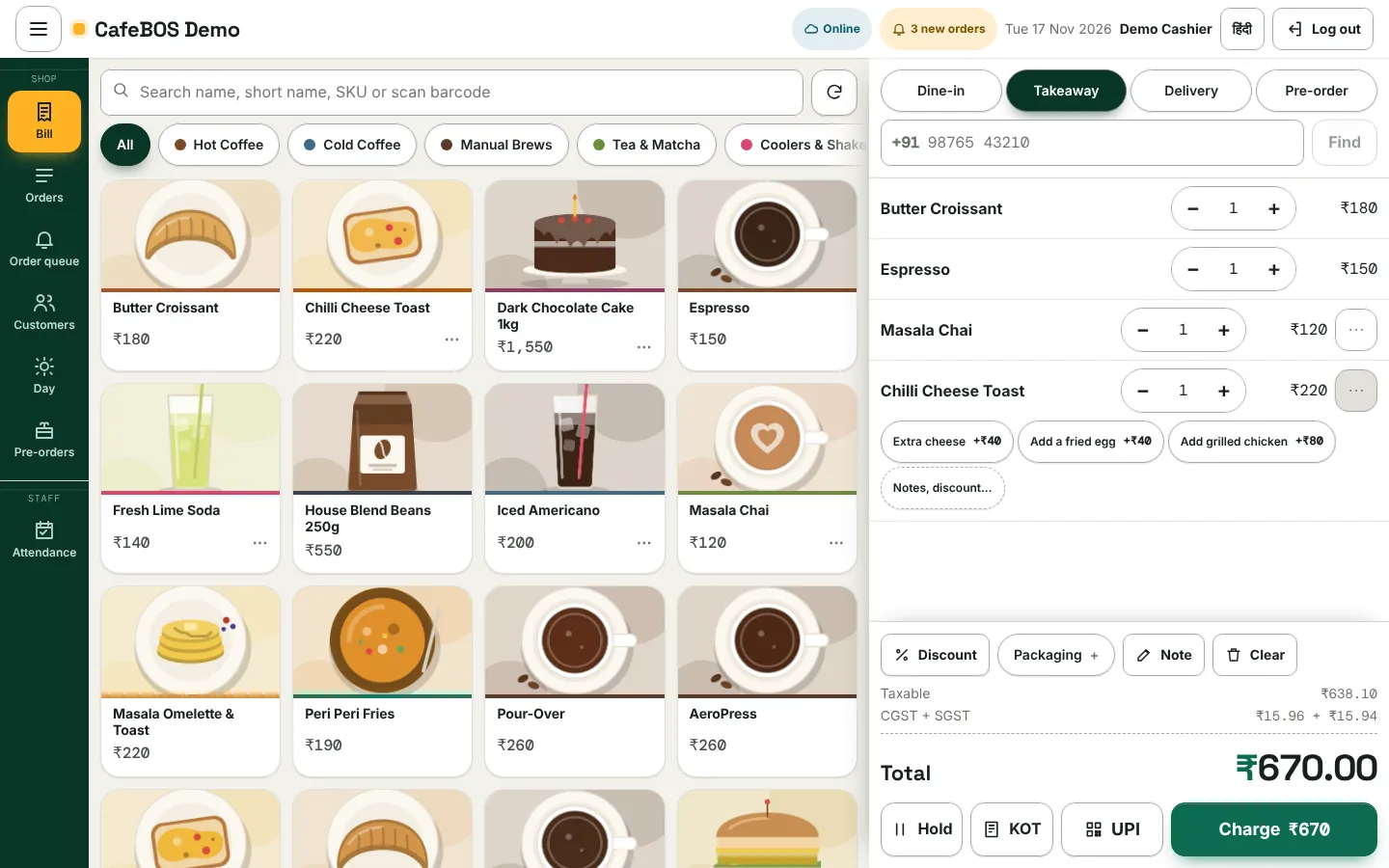
  • Dine-in, takeaway and delivery on one screen
  • GST worked out on every bill; credit notes and GSTR exports
  • Cash, UPI QR, split payments and customer credit (khata)
  • Kitchen and bar tickets, held bills, voids with a manager PIN
The CafeBOS bill screen with four items and a total of ₹670
Every morning

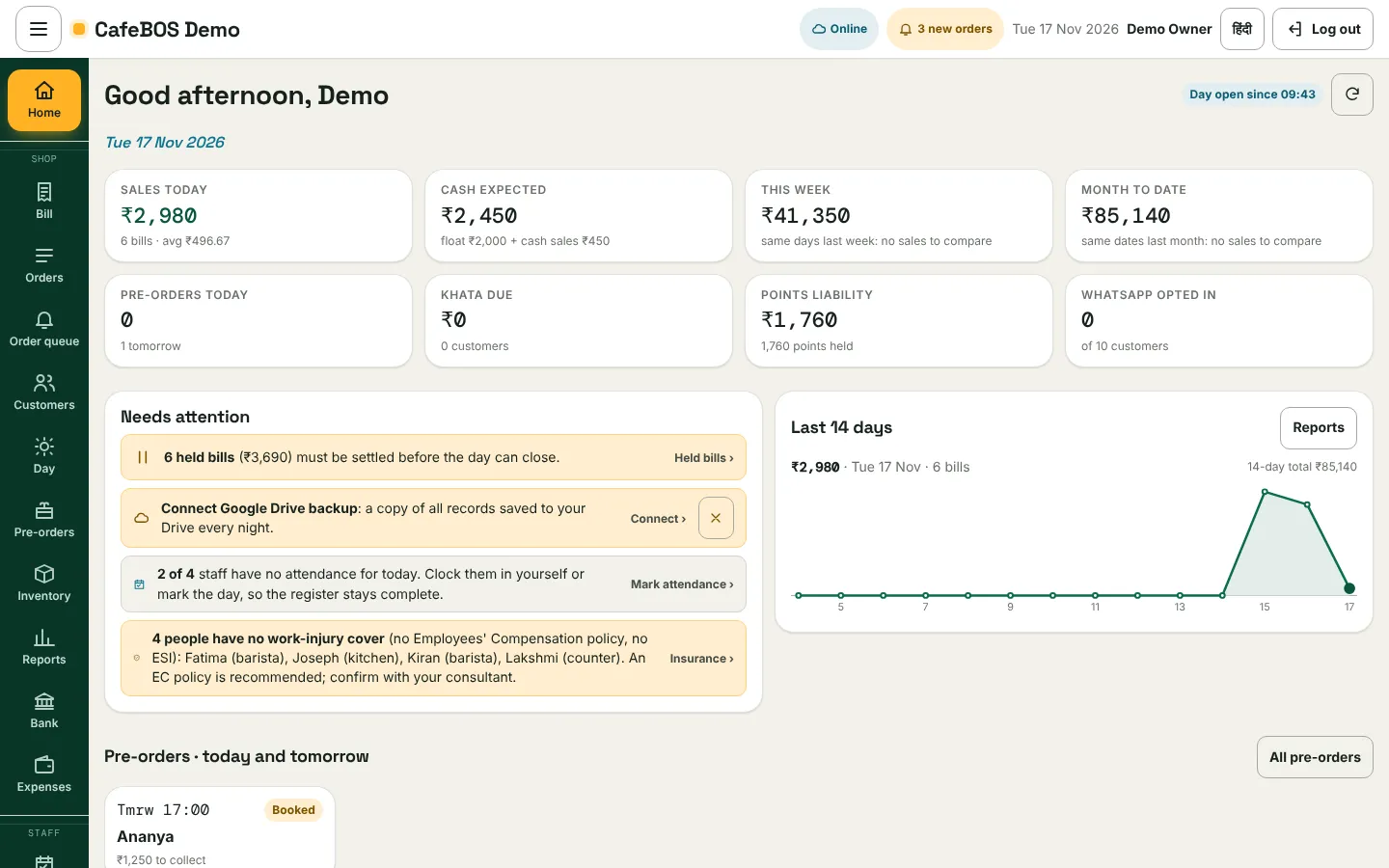
One screen tells you what needs you.

Sales, cash expected, held bills, staff without attendance, backups not set up: the home screen puts what needs a decision first.

Owner home screen with sales and items needing attention
Website and online ordering

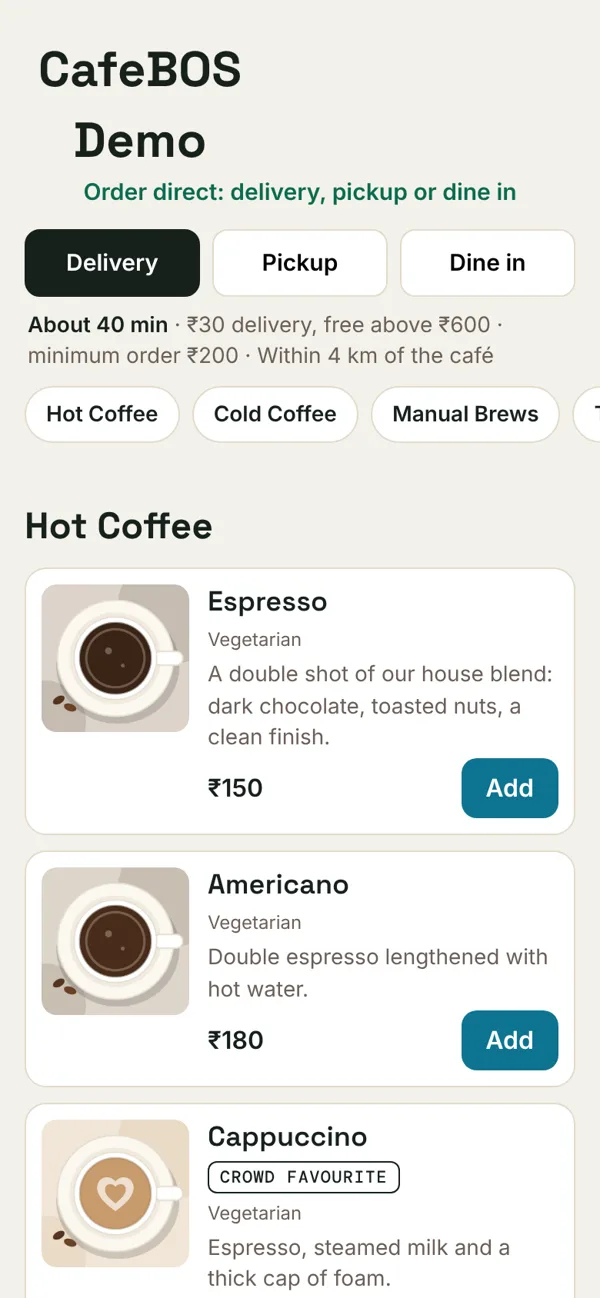
Your own website and QR menu, taking delivery and pickup orders.

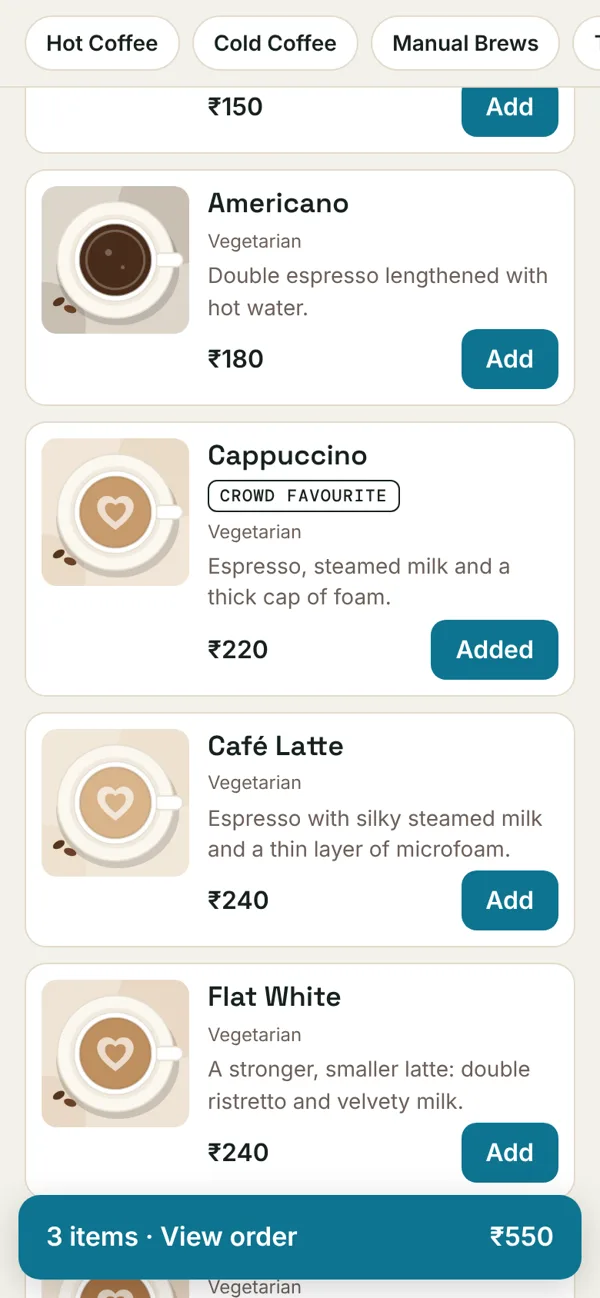
Designed in your brand, with the menu taken straight from the counter so it is never out of date. Customers order delivery, pickup or at the table, with your delivery charge, minimum order and free-delivery amount.

  • QR menu with photos and descriptions
  • Order tracking for the customer: sent, accepted, preparing, on the way
  • Google listing, price tags and QR standees set up by us
Customer order page on a phone with Delivery, Pickup and Dine inCustomer order page with three items in the basket
Orders and kitchen

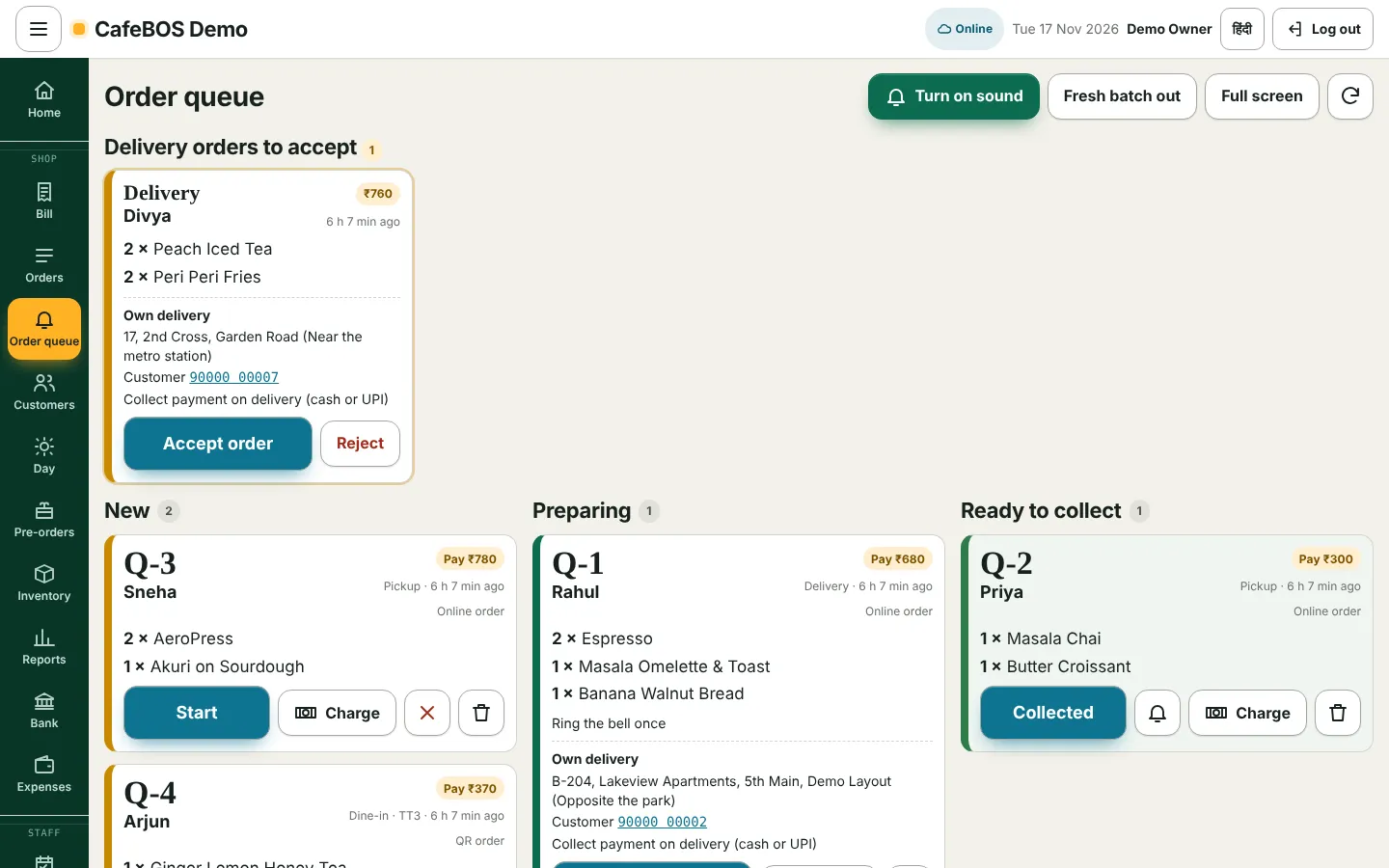
One queue for every order.

Website, QR and counter orders land together. Accept online deliveries, send tickets to the kitchen, tell customers when it is ready.

Order queue with a delivery waiting to be accepted
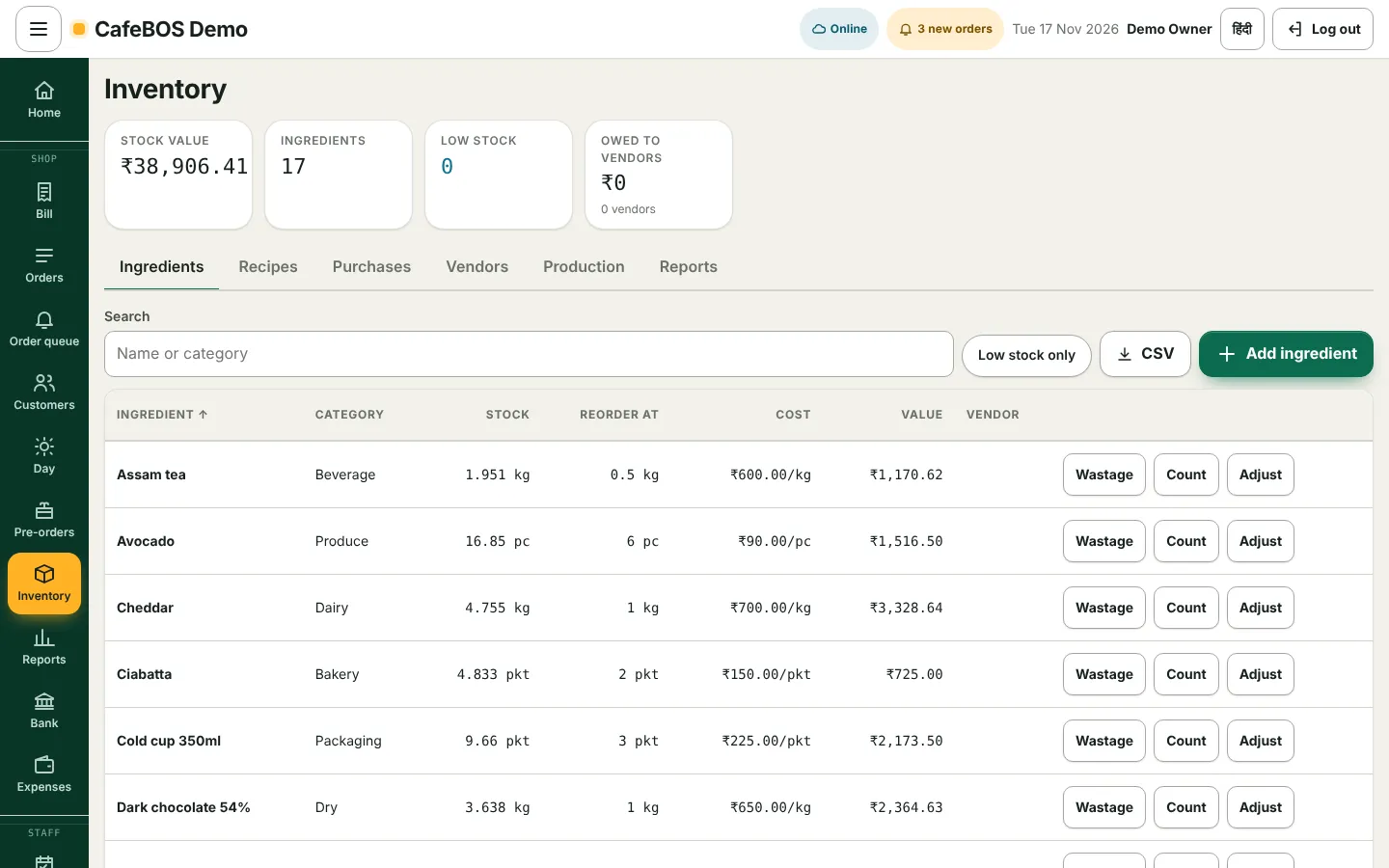
Stock and purchasing

Every sale counts itself.

  • Recipes deduct ingredients as you sell
  • Vendors, purchases and price history
  • Wastage, counts and low-stock flags
Inventory with stock value and ingredients
People

Your team, sorted.

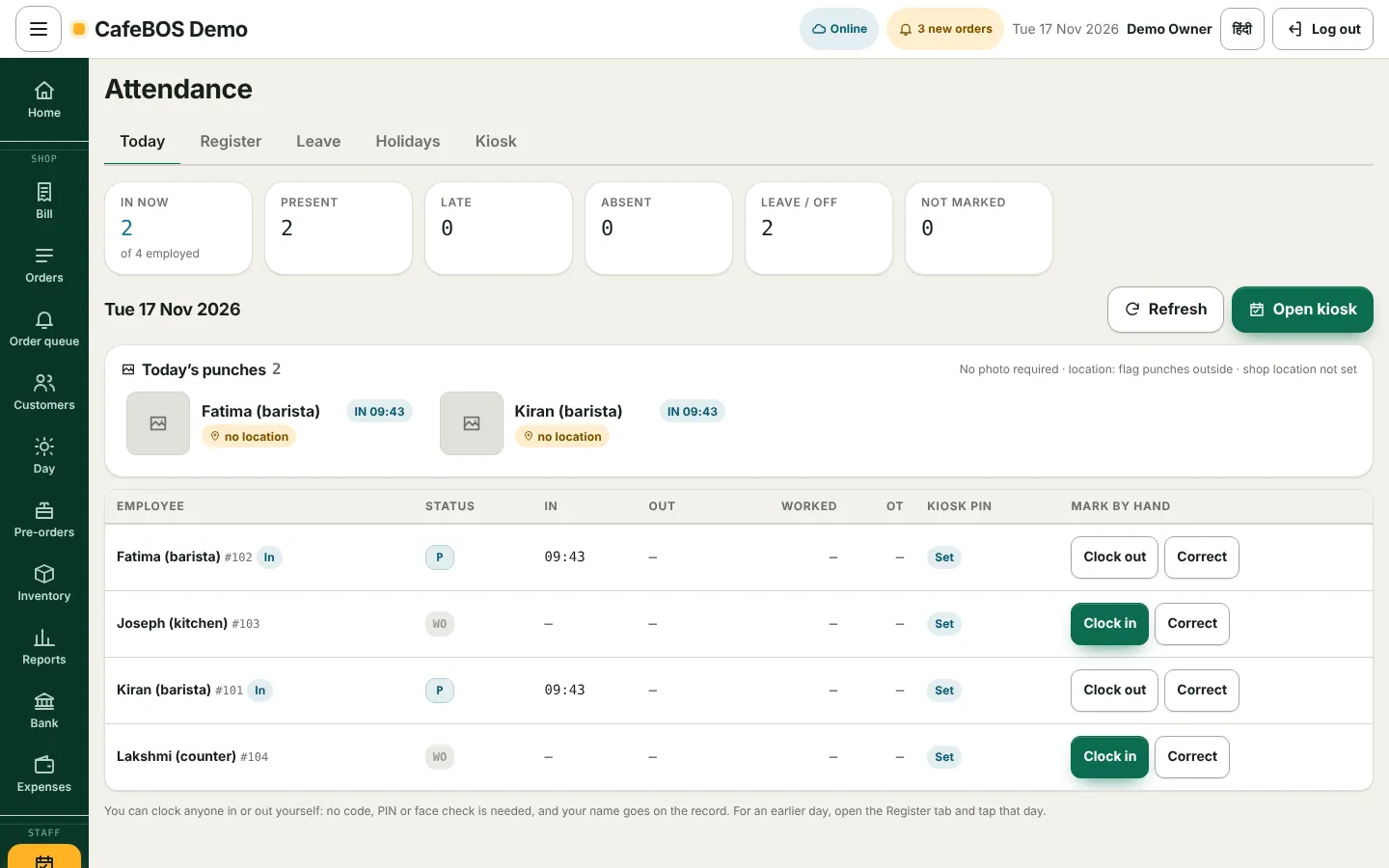
  • Clock in with a PIN or a face check that never keeps a photo
  • Location on phone punches; a tablet login just for attendance
  • Weekly or monthly payroll, advances, payslips, PT/ESI/PF
Attendance screen showing who is in today
Money

Money, matched.

Snap a bill and the expense is filed. Bank statements matched to sales and payments. Day close, GST reports and a daily email.

Customers and marketing

Bring them back.

A customer book with birthdays, loyalty points and wallet, coupons and vouchers, WhatsApp offers and a marketing calendar.

Records

Paperwork, kept.

Licences and documents with expiry reminders, a full audit log, and a daily copy of your records in your own Google Drive.

Built when you need it

Your café is not like the next one. Your system shouldn't be either.

We add what your café needs, when it needs it, and keep it working through every update. Things cafés ask us for next:

Table service and captain orderingSwiggy and Zomato in the same queueRecipe costing and menu marginsProfit and lossShift rosters and checklistsFood-safety logsCatering and bulk ordersA report only your café needs
How we work

Not a software vendor. Your technology partner.

We don't hand you a login and a help page. We come to your café, understand how it runs, and build a business operating system around it: the counter, the website, the delivery orders, the marketing. Then we stay, and keep adding to it as your café grows.

Your technology needs become our job, so your time goes back to your customers.

Usual billing softwareCafeBOS
Set-upYou configure menus, taxes and printersWe do it, from your menu and documents
FitSame screens for every caféBuilt around how your café works
WebsiteA separate vendor, if anyYours, in your brand, synced to the counter
New needsWait for the roadmapWe build it for you
Marketing and deliveryMore apps, more loginsPart of the same system, set up with you
Your dataShared platformYour own database, handed over if you leave
PriceFixed plans and paid add-onsGrows with your café

Listen

We spend time with you and your team. What you sell, how orders come in, what keeps you up at night.

Build

Your system and website from your own menu, photos, licences and brand. You get a preview to correct before anything goes live.

Launch

Hardware checked, staff PINs set, training in your team's language, and a practice day alongside your old way.

Run and grow

Close support for the first two weeks, then updates, backups and new modules as you need them. One team that knows your setup.

Pricing

We grow when you grow.

There is no price list, because there is no off-the-shelf package. Your fee is agreed with you and linked to the size of your café: small while you are starting out, rising only as your business does. When you have a slow month, so do we.

  • Your system, built and set up
  • Your website and QR menu
  • Hosting, backups and security updates
  • Training for your staff
  • New modules as you need them
  • One team to call

Charges from outside providers you choose to use, such as a payment gateway, WhatsApp Business messages or a delivery platform, are billed to you by them.

Fixed plans and add-ons CafeBOS: in step with you Your café's growth → What you pay

Illustration of the idea, not a quote. Your fee is agreed with you before we start.

No licence fee

You are not buying software; you are bringing on a partner.

No add-on charges

A module you need is switched on or built, not sold to you separately.

No lock-in

Leave when you like, and take a full copy of your data with you.

Live demo

Don't take our word for it. Run the café yourself.

CafeBOS Demo is a working café with a menu, customers, staff and a few days of sales. Pick a login, enter its PIN and try anything. Nothing you do there is real, and the demo resets every night.

Open the demo: cafebos.vikasmalpani.com →
LoginPINTry
Demo Owner246810Everything, settings, reports
Demo Manager135790Attendance, queue, day close
Demo Cashier1234Billing and the order queue
Demo Kitchen4321Kitchen screen
Demo Attendance2580Clock-in tablet (staff 101, PIN 1357)

These PINs are public and for the demo only.

Four things to try

  1. Open cafebos.vikasmalpani.com/m on your phone and order a delivery as a customer.
  2. Log in as Demo Cashier, accept that order in the Order queue and send it to the kitchen.
  3. Make a takeaway bill and watch GST, stock and loyalty update.
  4. Log in as Demo Owner and read the home screen: that is your morning in one page.
Built to be trusted

Proven at a real counter.

CafeBOS grew out of the system that runs a working bakery-café in Bengaluru every day, from the first coffee to the day-close report.

A system of your own

Your own database and web address. Your sales and customers never sit with another café's.

Looked after every day

Nightly backups, a daily copy to your own Google Drive, and every update tested on a copy before it reaches your counter.

Careful with people's data

Staff personal details are encrypted. The face check stores numbers, never a photo. Staff sign in with PINs on devices you trust.

Questions

What owners ask us.

Is CafeBOS a subscription app I sign up for?

No. We don't sell CafeBOS as self-serve software at the moment. We work with each café as a partner: we understand your needs, build your system and website, and run it with you.

How much does it cost?

Your fee is linked to your café's size and grows as your business grows. We agree it with you before we start, with nothing hidden. Outside providers you choose, such as a payment gateway or WhatsApp Business, bill you directly.

How long does it take to go live?

We aim to show you a preview built from your own menu within a working day of receiving your material, and to go live within a week of your approval, with a practice day alongside your current setup.

What happens if the internet drops?

Tell us how your café is connected and we'll plan for it with you, including a backup connection for the counter. We'll be straight with you about what works offline before you rely on it.

Do you handle deliveries?

Your website takes delivery orders directly, with your own charges and area, and they arrive in the same queue as counter orders. Connecting delivery platforms and delivery partners is something we set up with you when you're ready.

Can I leave?

Yes. Give notice and we hand over a complete copy of your data. Your customers, sales and records are yours.

Who does my GST filing?

CafeBOS works out GST on every bill and prepares the reports and exports. Filing stays with you or your accountant, who can be given their own access.
Let's talk

See your café on CafeBOS, with your own menu.

Tell us a little about your café. We'll get back to you, and if you send a photo of your menu we'll show you a preview of your café running on CafeBOS.

WhatsApp us: +91 98860 63375 Try the live demo →